Learn · First steps · 3 min read
Labels and completion states
This is the most important page in the manual. Most of what makes Wodo different follows from one idea: there are no built-in statuses.
Your words, your process
The TODO / Doing / Done columns from the first page? That's a label called Status with three values, created by a template, not hardcoded by us. Rename the label to Fase with Te doen / Bezig / Klaar. Or Stage with Drafting / Review / Filed. Or throw it away and make something else. Your language, your terminology, your process.
A space can have several labels: Status, Priority, Team, Component, Client, whatever dimensions your work actually has. Each label has values, each value has a color. You manage all of this in Space Settings → Labels.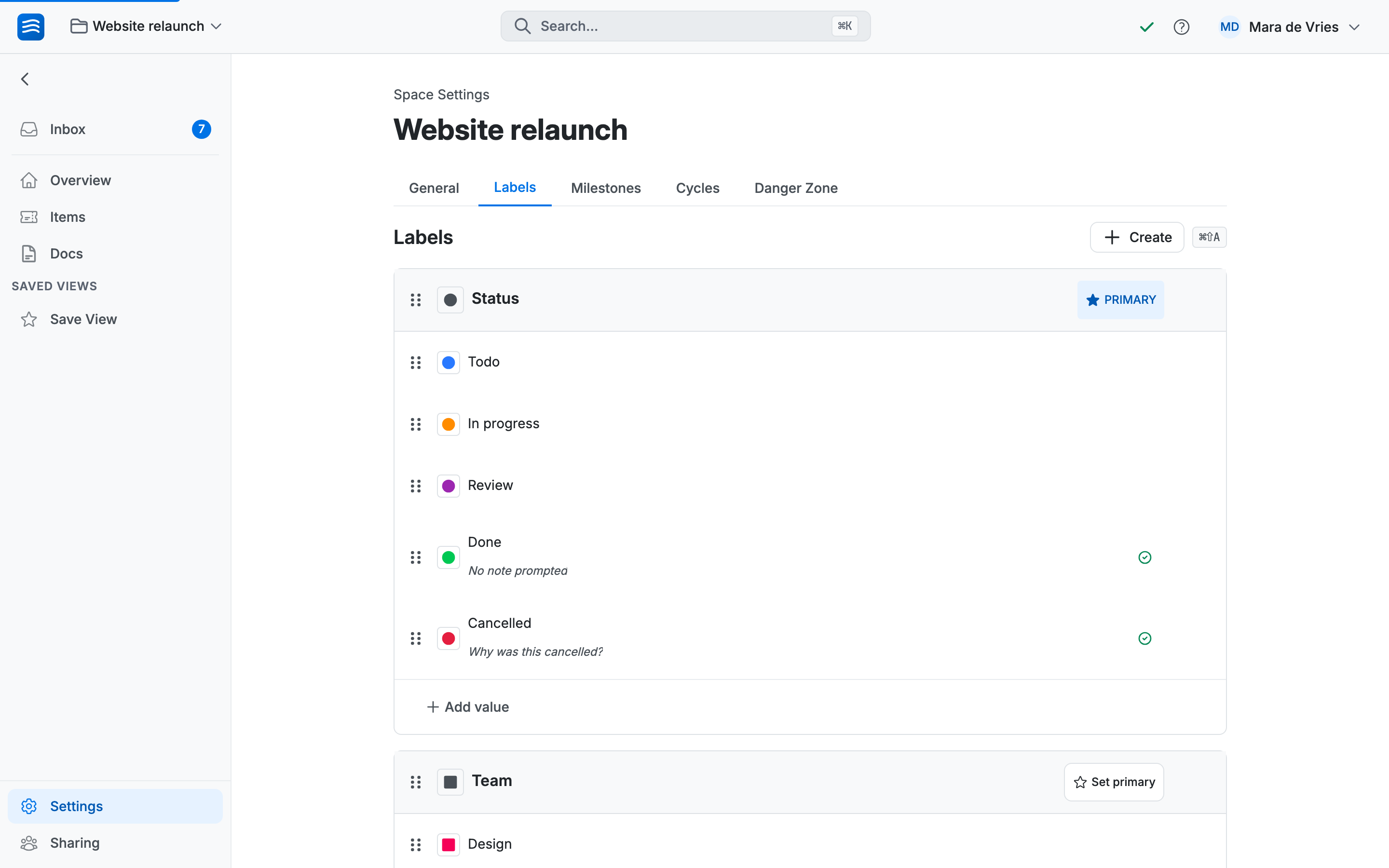
One label per space can be marked Primary: it drives the card colors and the default board columns. Usually that's whatever plays the role of "status" in your world.
Completion states: telling Wodo what "finished" means
Here's the catch with total freedom: if your values can be any words in any language, Wodo can't guess which of them mean this work is finished. So you tell it.
In Space Settings, hover over a label value and click the check-circle that appears. Its tooltip says "Mark as completion state".
An item that reaches a completion state counts as complete, and a few useful things follow:
- It leaves assignees' inboxes; done work doesn't nag.
- It can be archived automatically after a delay you configure.
- If it's a sub-item, its parent shows it struck through; progress at a glance.
Multiple final values are normal. Done and Cancelled are both completion states. They both mean the work ends here, for different reasons.
Completion prompts: asking why
Any completion state can carry an optional question, asked when an item lands on it. Type it in the prompt row under the value: "Why was this cancelled?" on Cancelled. "Where is it live?" on Shipped. "What did we learn?" on Abandoned.
When someone drags an item there, the question appears as a small toast, not a modal taking over the screen. They can answer or ignore it; the prompt stays available in the item's panel either way, and the answer remains attached to the item, editable and searchable, for as long as the item exists.
Six months later, when somebody asks why that initiative was cancelled, the answer is on the item. That's the point.Going further